


Stickman Party 234 MiniGames
4.69.81K Reviews
App Specs
- Version
- 2.4.9.2
- Updated On
- License
- Free
- Downloads
- 500,000,000+
- Developer
- PlayMax Game Studio
- Categories
- Arcade
- Platform
- Android
Screenshots


 Analysis by AppCompare
I tend to reach for a party game when a group has a few spare minutes but nobody wants to commit to a long match or learn a complicated rule set. Stickman Party 234 MiniGames is built for that kind of moment: a collection of quick arcade diversions that can turn one phone into a shared activity. Its appeal is easy to understand, though the experience depends a lot on who is playing and how comfortably everyone can gather around the same screen.
Quick rounds, low commitment
The short-match format is the main reason I’d keep this game around. It suits an awkward wait, a quiet stretch at a family gathering, or the few minutes before everyone is ready to leave. You can start with a quick race, then switch to a different style of challenge rather than asking the group to stay invested in one lengthy game. That variety helps when people have different attention spans or gaming experience.
I also like that the arcade approach makes the first step feel manageable. A newcomer can watch one round, get the basic idea, and join in without needing a separate console or a lengthy explanation. For a casual group, that is more useful than a deep progression system. The trade-off is that quick variety is not the same as a carefully balanced competitive game: players looking for long-term mastery, elaborate tactics, or a serious tournament structure may find the experience lightweight.
When one device becomes the gathering point
A realistic use is a family visit where children and adults are waiting for food or for the next activity. One person can pass the phone around, or several players can crowd around it together, and a round gives everyone a shared focus. I’d choose a clear, stable surface and agree whose turn or control space belongs where before starting. That small bit of organization helps avoid the familiar problem of hands colliding over a compact screen.
Local play is also useful when mobile reception is poor, when you want to avoid depending on a shared Wi-Fi connection, or when you simply want a game that works as an immediate group activity without asking everyone to install and join separately. It is best thought of as a communal phone game, not a replacement for online matchmaking. If your friends are in different places, a game designed around remote multiplayer will be a better fit.
How it compares with other arcade choices
Compared with a single-purpose racing game, the collection has an advantage when the group cannot agree on one activity: racing, tank battles, and football give you different flavors to try. Compared with a conventional party game that depends on talking, bluffing, or taking turns, this one puts the action directly on the screen. That can be a welcome change for a group that wants quick competition, but it is less suited to people who prefer social games where nobody needs to watch a small display closely.
The shared-screen format is its own compromise. It makes spontaneous play simple because the group needs only one device, yet it also means everyone has to be physically close and able to see the action. On a small phone, four people may have to lean in, and the viewing angle can matter as much as the game itself. A larger screen or a smaller group can make a session more comfortable; for a big room, a game projected on a television or played on separate devices is usually easier to follow.
Worth Reading Before You Choose

Baby Panda World Brings Quick Play to Modern Phones, but Its Game Library Feels Busy

ESPN’s Live Game View Makes Following Close Games Easier

QuizzLand Review: A Good Fit for Short Trivia Breaks, Not Every Player

Basketball Stars: Multiplayer Is Fast, but Can It Recover When Matches Go Wrong?

WEBTOON Turns Phone Updates Into a Better Reading Routine

Link to Windows Runs on Shared Habits, Not Social Feeds
Practical tips for smoother sessions
I would treat the first round as a warm-up rather than immediately making it the decisive match. It gives everyone time to understand the controls and find a comfortable position around the device. If one person is new, rotate who chooses the next mini-game so the most experienced player does not turn every round into a test of reflexes. Short games make that kind of informal balancing easy without needing house rules or a long setup.
There is also a useful distinction between playing alone and playing socially. Solo play can fill a brief gap, but the collection’s clearest purpose is shared play; if you mostly want a deep single-player arcade challenge, a dedicated game may hold your attention longer. Conversely, if you often have company and want something everyone can try quickly, the variety is more valuable than a single polished competition loop.
Who may want a different game
I would skip it if your ideal game depends on precise, expansive controls, a long campaign, or online competition with people who are not in the room. The multi-player setup can also be awkward when the group is large, when people do not want to pass a phone around, or when the screen is difficult for everyone to see. And although the game is rated for everyone, a parent should still decide whether shared device time and any optional purchases suit their household.
It is free to download, with optional in-app purchases listed from about one dollar to twenty dollars per item. I would approach those as extras rather than a reason to install: the main question is whether the local mini-game format fits your group. If you prefer to keep spending controlled, check purchase settings on the device before handing it to a child. That is a sensible precaution for any game with optional purchases, not a judgment about how often someone will encounter them.
Jumping Into the Fun
First things first, Stickman Party 234 MiniGames is all about simplicity and enjoyment. Imagine a collection of mini-games that you can play solo or with friends, all wrapped up in a quirky stickman theme. The moment I opened the app, I was greeted with vibrant graphics and a catchy tune that just screams "let's play!" The interface is intuitive, making it easy for anyone to dive right in, whether you're a seasoned gamer or just someone looking for a good time.
Mini-Games Galore
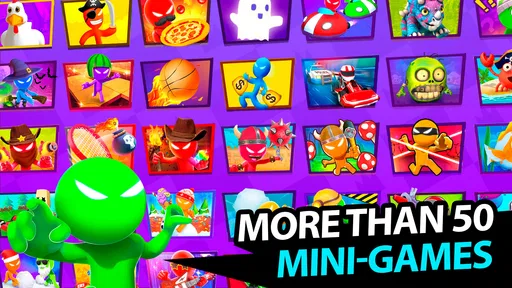
What stands out in this app is the sheer variety of games available. We’re talking about everything from racing to classic arcade styles. My personal favorites are the ones where you get to outsmart your friends in a quick, strategic showdown. Each game is short and sweet, perfect for keeping the energy up without anyone losing interest.
If you love racing, there’s a mini-game for that. Prefer something a bit more strategic, like tank battles? Yep, they’ve got that too. And the best part? You don’t need an internet connection to play, which is a lifesaver when you’re out and about or visiting places with sketchy Wi-Fi.
Multiplayer Mayhem
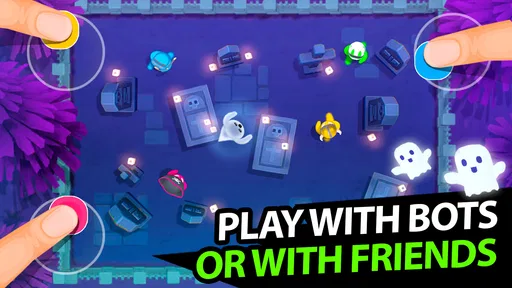
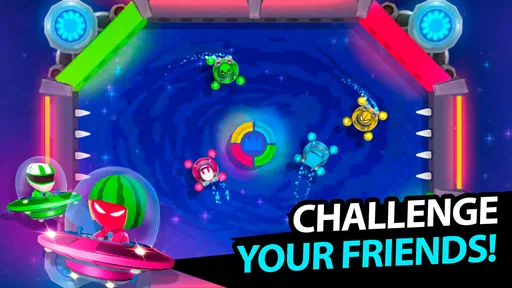
The app truly shines when you’re playing with friends. You can have up to four players on a single device! I was skeptical at first, wondering how cramped it would be, but it’s surprisingly manageable. We were all huddled around my phone, laughing and trying to outdo each other. Trust me, it’s a great way to break the ice at a party or family gathering.
What’s great is that the controls are straightforward, so there’s no steep learning curve. You tap, swipe, and tilt your way to victory, which keeps things light and enjoyable.
Keeping It Fresh
One thing I really appreciate is how the developers keep updating the app. New games and features are added regularly, which means there’s always something new to look forward to. This keeps the app from feeling stale, and it’s always fun to check out what’s new.
The updates are seamless, and I didn’t experience any glitches or crashes, which is a huge plus. It’s clear the developers care about user experience and are committed to making Stickman Party 234 MiniGames the best it can be.
Speed, reliability, and device fit
Because the matches are brief and the visuals are simple, I would expect the game to feel more immediate than a large, demanding arcade title. That is an expectation based on its lightweight style, not a promise about loading time or performance on every phone. Actual responsiveness can vary with the device and its condition, so I would close other demanding apps if a phone already feels sluggish before a group session.
Heavy use is more likely to mean several rounds in a row with everyone taking turns than one especially complex match. For that kind of session, the practical issue is often comfort: a phone can become tiring to hold out for a crowd, and people at the edges may struggle to see. I’d put it on a table, keep the screen brightness comfortable, and take a short pause if the device or players start feeling warm or fatigued. Those habits make the shared experience easier without assuming anything about battery drain or heat on a particular model.
For reliability, I value being able to play offline because it removes network quality as one common source of interruption. It does not mean every session is immune to device or software problems, but it makes the game a useful fallback in places where connection is unreliable. If a round is interrupted by a notification or the app needs to be reopened, I would simply restart the short match rather than plan a long session that depends on preserving progress.
The game is free, is developed by PlayMax Game Studio, and has an Everyone age rating. Its average rating is 4.6 from around 2.8 million ratings, with about 9,700 written reviews, and it has passed 500 million installs. It was released on March 23, 2019; the current version is 2.4.9.2, and the minimum Android requirement is 7.0. Those details make it easy to see why it is widely tried, but a large audience does not guarantee that its shared-screen controls will suit every household or device.
Choosing the right setup
Before installing, I would think about the phone that will host the game and the people who will gather around it. A device running Android 7.0 or later meets the stated minimum, but meeting a minimum is not the same as guaranteeing a particular speed or visual comfort. On an older or already crowded phone, I would try a round alone first, then invite others once I know the screen and controls feel responsive enough for the group.
On iOS, the game is also available, which makes it convenient for households that use Apple devices. I would still treat the host phone as the shared controller and viewing surface: having different phone brands in the room does not change the basic need to crowd around one screen. If your group values a large image, precise individual controls, or a fixed place for every player, a console party game or separate-device multiplayer title will likely be more comfortable.
Popularity is not the same as a perfect fit
With an average rating of 4.6 and more than 500 million installs, this is clearly a familiar choice for casual play. I read that reach as evidence that the simple pick-up-and-play idea has broad appeal, not as proof that every mini-game will become a favorite. The strongest reason to try it is specific: you want quick, local competition on one device. If that is not how you play, the headline numbers should not outweigh your own preference for longer sessions or online play.
The best way to judge it is to give the group a few different rounds and notice whether people ask to keep playing. If they do, the variety and low setup effort are doing their job. If they spend more time negotiating who can see the screen than enjoying the match, that is useful feedback too; a different format may suit the group better than trying to force a shared-phone game into a bigger gathering.
Perfect for All Ages
Another thing I noticed is how family-friendly the app is. The graphics are colorful and fun, without being too flashy or overwhelming. It’s something kids would love, but it’s equally entertaining for adults. It’s a rare find to have an app that fits such a wide age range perfectly.
If you’re looking for a way to bring different generations together, this app does the job beautifully. It’s simple enough for the younger ones but engaging enough to keep everyone entertained.
Final Thoughts
In a world full of complex apps and games, Stickman Party 234 MiniGames is a breath of fresh air. It’s easy, fun, and incredibly social. Whether you’re looking to kill a few minutes or spice up a gathering, it’s worth having on your device.
So, what are you waiting for? Go ahead, give it a download, and let the fun begin! You can check out the app on both Android and iOS, which makes it super accessible for everyone. Trust me, once you start playing, you won't want to stop. Enjoy!
Pros
- Wide variety of mini-games for endless fun.
- Simple controls suitable for all ages.
- Offline mode allows play without internet.
- Supports up to 4 players on one device.
- Colorful graphics keep the experience lively.
Cons
- Limited game depth might bore quickly.
- Ads can interrupt the gaming experience.
- No online multiplayer option available.
- Some mini-games feel similar to each other.
- In-app purchases can enhance unfairly.
FAQs for Stickman Party 234 MiniGames
What is Stickman Party 234 MiniGames?
Stickman Party 234 MiniGames is a collection of entertaining and engaging mini-games designed for both single-player and multiplayer modes. The app features a variety of games, from racing and soccer to tank battles, all designed with simple controls and colorful graphics. It's perfect for parties or casual gaming sessions.
Can Stickman Party be played offline?
Yes, Stickman Party 234 MiniGames can be played offline. This makes it a great choice for times when you don't have internet access. You can enjoy all the mini-games without needing a Wi-Fi connection, making it convenient for travel or locations with limited connectivity.
How many players can join in multiplayer mode?
Stickman Party 234 MiniGames supports local multiplayer for up to four players on the same device. This is ideal for playing with friends or family, offering a competitive and fun experience. Each player can take control of their own stickman character using a section of the touchscreen.
Are there in-app purchases in Stickman Party?
Yes, Stickman Party 234 MiniGames includes in-app purchases. These purchases typically offer enhancements such as removing ads or unlocking additional content. However, the core experience is free, and you can enjoy a wide range of mini-games without spending any money.
Is Stickman Party suitable for children?
Stickman Party 234 MiniGames is generally suitable for children. The games are designed with fun and simplicity in mind, featuring colorful graphics and easy-to-understand gameplay. However, parents should be aware of in-app purchases and supervise accordingly to prevent unintended spending.


